Why this streamer entered my system
I recently found myself in a familiar but slightly uncomfortable situation: I needed a new streamer.
After moving away from an all-in-one device in favor of a separate amplifier, the digital front end suddenly became exposed. To keep things moving, I transferred the Bluesound Node 2i and an iFi Zen One Signature DAC from my secondary system into the main setup.
It worked.
But it also revealed a problem.
The sound was okay, but clearly not on the same level as the rest of the system. There was a slight shoutiness to the presentation, a boxy quality that made images feel constrained, and an overall sense of fatigue that crept in during longer sessions. Nothing was outright broken — but it was obvious that the digital side was now the weakest link.
So the hunt began.
As a result, it became clear that the digital front end deserved the same level of attention as the rest of the system.
What I was looking for was fairly specific:
- Clearly above entry-level streaming quality
- A solid DAC integrated into the unit
- Digital inputs for my CD transport
- No separate streamer + DAC stack (at least not yet)
- A display would be nice, but not mandatory
- No “great for the money” compromise device
In other words, I didn’t want to constantly think about what I was not getting.
The search – narrowing it down
To narrow things down, I focused only on devices that could realistically fit both my system and my listening habits.
A few obvious candidates quickly emerged.
Wiim Ultra
The Wiim Ultra is everywhere right now, and for good reason. It’s extremely capable for the price and widely praised. However, being impressive for the money wasn’t what I was looking for this time. I wanted something that simply sounded excellent, without qualifiers.
Eversolo DMP-A8
At the other end of the spectrum sits the DMP-A8. It does everything, looks fantastic, and is widely regarded as sounding superb. At the same time, it also sits comfortably above the budget I was willing to spend for this upgrade.
Eversolo DMP-A6 Gen2
This one felt like the natural middle ground. All the inputs I needed, a large and attractive display, and a reputation for strong sound quality. I was genuinely close to ordering it. In the end, what stopped me was a recurring theme in reviews: a tendency toward a brighter, more forward sound. Given that my speakers already lean slightly that way in the treble, I decided not to risk it — even though I’m sure I would have enjoyed the endless settings and tweakability.
At first, I didn’t give much attention to the Node Icon.
On paper, the display and overall look didn’t seem to compete with the Eversolo, especially considering the price difference. However, the more I read and listened to others’ experiences, the more one thing stood out: everyone talked about the sound.
Add to that my positive long-term experience with the Node 2i, the advantage of staying in the BluOS ecosystem, and the added flexibility of features like sub-out, Dirac Live option, and Bluetooth transmission. Eventually, curiosity got the better of me.
I ordered the device.
The product – familiar, refined, and purpose-driven
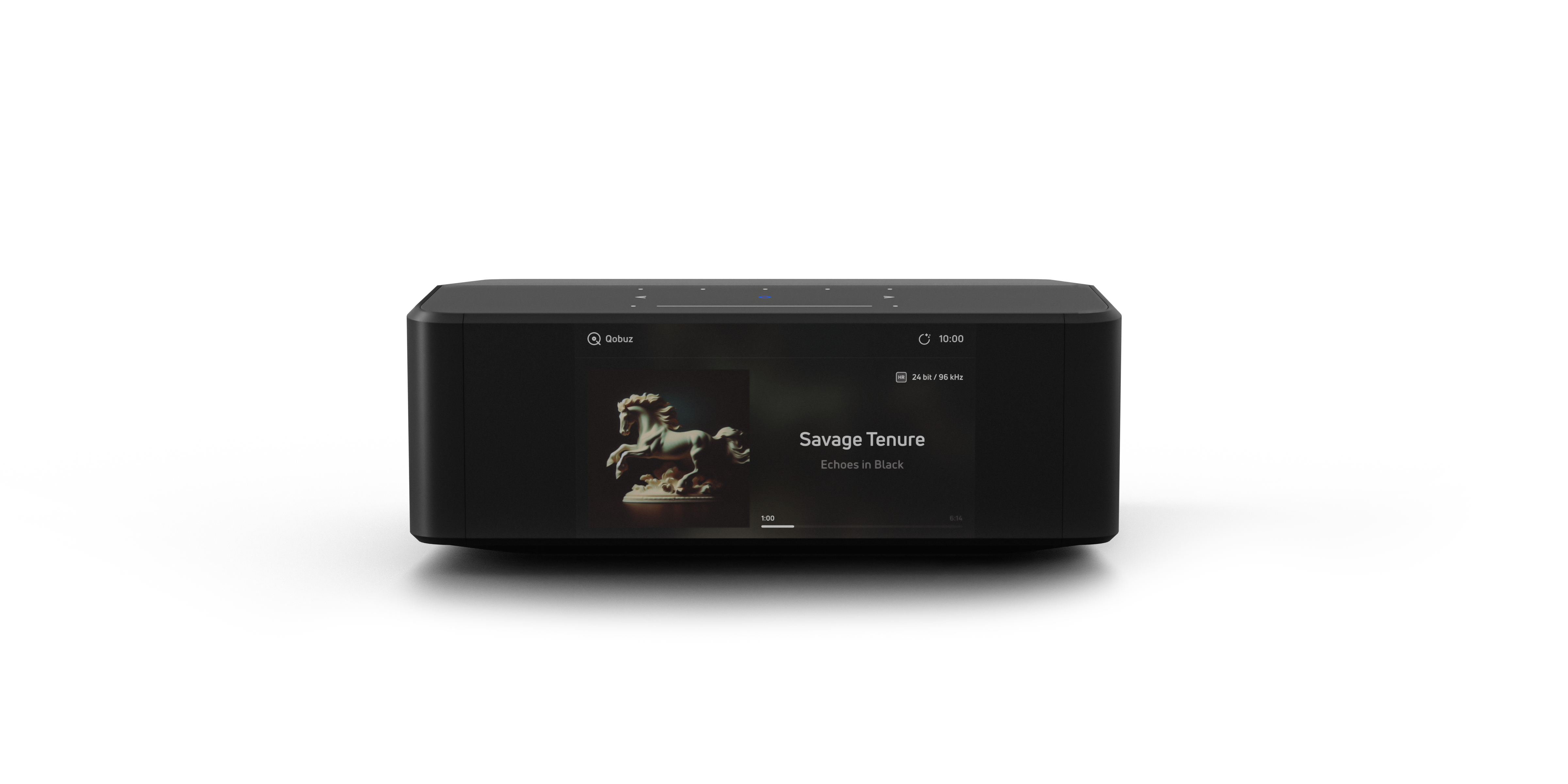
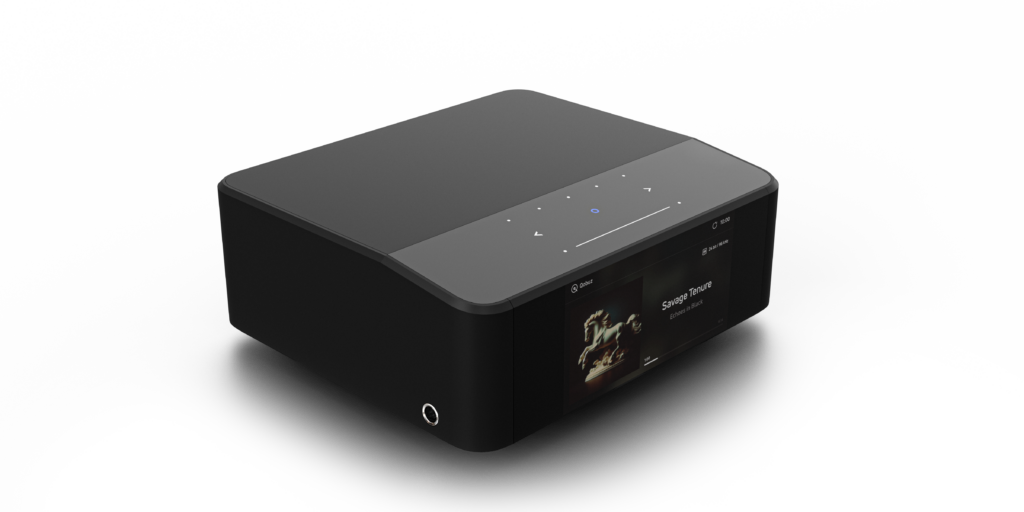
The Node Icon is instantly recognizable as a Bluesound product. Compact, understated, and clearly designed to fit into real-world systems rather than dominate a rack visually.
Build quality is decent. It feels solid and well assembled, but it doesn’t scream “top-of-the-line” when you first pick it up. There’s nothing to complain about — but also nothing indulgent or luxurious here. Instead, the focus is clearly elsewhere.
On the software side, BluOS is a known quantity. I won’t go into deep detail, as it’s been covered extensively elsewhere. In short: it works well. That said, usability and long-term stability matter just as much as raw features.
Is it perfect? No.
Is there room for improvement? Definitely.
Still, it’s one of the best streaming platforms I know. It’s not Roon — but it’s also essentially free, stable, integrates seamlessly with other BluOS devices, and receives frequent updates. In practice, connectivity has been flawless, and Bluesound seems responsive when issues are reported.
It’s not Roon, but it’s stable, fast, and basically free — and that’s hard to argue with.
DAC architecture – timing, separation, and control
At the heart of the Node Icon sits a dual-mono DAC design, built around two ESS Sabre ES9039Q2M DACs, one dedicated to each channel. This layout is intended to improve channel separation, reduce noise, and provide a more stable and predictable conversion stage than single-DAC designs.
The surrounding circuitry is deliberately kept transparent and low-noise, allowing the DACs to operate without unnecessary coloration or processing. The result is a presentation that prioritizes dynamic range, low distortion, and fine resolution — not by emphasizing detail, but by preserving structure and timing.
An additional layer comes from MQA Labs’ QRONO d2a technology, which focuses specifically on time-domain accuracy during digital-to-analogue conversion. Rather than altering tonal balance, QRONO aims to correct timing errors introduced in the conversion process, aligning the impulse response more closely with the original recording.
In practice, this contributes to a more coherent sense of rhythm and spatial organization. Transients feel better defined, images are more stable, and musical flow benefits in subtle but cumulative ways. It’s not a feature that calls attention to itself — but once in place, it’s difficult to ignore its contribution to the overall calm and confidence of the presentation.
First impressions – where the Node Icon earns its name
After the Node Icon arrived, I did a direct A/B comparison against the Node 2i paired with the iFi DAC.
The difference was immediate — and honestly, shocking.
This is where the Node Icon justifies its existence. From the very first minutes, the difference was not subtle.
The soundstage opened up noticeably, becoming wider and more convincing. Instrument separation improved across the board, transients were cleaner and more precise, and bass reached deeper while gaining definition and authority. As a result, the overall presentation became more natural and less fatiguing.
Music felt livelier, more fluid, and more confident.
It wasn’t about emphasizing detail or adding artificial excitement. Rather, it was about removing constraints. Everything the system had been hinting at before finally came together.
Everything the system had been hinting at before finally came together.
The hype is real.
Day-to-day use – small things done right
In daily use, it’s often the small things that shape long-term satisfaction.
One feature I really appreciate is the ability to program any remote control. This makes integration into a universal remote setup effortless — something that’s surprisingly still not a given with many streamers.
Another small but meaningful detail is how quickly the Node Icon wakes from standby. When playback is initiated, it comes on almost instantly. As a result, it feels responsive and ready, which adds to the sense of polish in everyday use.
The device does get noticeably warm during operation — not alarmingly hot, but warmer than expected. While this hasn’t caused any issues, it’s something to keep in mind, especially in enclosed furniture.
Headphone output – unexpectedly serious
One feature I didn’t initially expect to matter much turned out to be genuinely impressive: the headphone section.
The Node Icon uses THX AAA™ headphone amplifier technology, a design known for extremely low distortion and high linearity. It offers two full-size 1/4″ headphone jacks, which also helps with cable management and flexible placement.
Listening with high-quality headphones, the presentation is clean, controlled, and spacious, with very low noise and excellent clarity. This doesn’t feel like an afterthought or convenience feature. Instead, it’s a properly implemented, audiophile-grade headphone stage that can easily stand on its own.
For users who alternate between speakers and headphones, this adds real value and further reinforces the Node Icon’s role as a central digital component.
The display – good idea, compromised execution
The display is one of the Node Icon’s headline features — and also its weakest point.
I like the idea of having a display, and I’m glad Bluesound finally added one. Unfortunately, the execution feels compromised.
From a specification standpoint, the display is actually quite ambitious: a 5-inch full-colour HD panel with a backlit touch surface and onboard presets. On paper, it’s a significant step forward for Bluesound.
In practice, however, the hardware potential isn’t fully translated into real-world usability. The screen is LCD rather than OLED, meaning it’s always backlit. Even black areas glow, making it unusable as a clock in standby. Thankfully, the display can be turned off entirely.
Brightness remains too low for album art, and resolution and font sizes feel dated. From my listening position about 2.5 meters away, only the clock is readable. As a result, the screen is effectively useful only in a desktop or near-field setup.
This feels less like a missed opportunity and more like an unfinished one. Larger fonts, better layout options, or something like VU meters could dramatically improve the experience through software alone.
One thing I don’t miss is touch interaction. Instead, the device is app-driven anyway, and I have no issue with the display being view-only.
Dirac Live – powerful option, used with restraint
One feature worth addressing separately is Dirac Live support.
The Node Icon is Dirac Live-ready, meaning room correction can be applied directly at the streamer level. Importantly, Dirac is entirely optional. The device works perfectly fine without it, and nothing is enabled by default.
Activating Dirac requires the purchase of a separate license:
- USD 159 for the limited bandwidth version
- USD 249 for the full bandwidth version
In other words, Dirac is there when you need it, but never forced upon you.
In theory, Dirac Live can be extremely powerful, especially in rooms with problematic bass behavior, asymmetrical layouts, or when integrating a subwoofer. For many users, it can significantly improve tonal balance and low-frequency control.
In practice, I approach room correction with caution. I’ve experimented with Dirac and similar systems in the past. While the improvements in cleanliness and control are often obvious, I sometimes felt that a certain spontaneity and ease were lost in the process.
As a result, in my own system — with careful speaker placement and some basic room treatment already in place — I chose not to enable Dirac for everyday listening. Instead, I prefer addressing room issues acoustically first and keeping the signal path as simple as possible.
Still, having Dirac available adds flexibility and future-proofing without dictating a specific way of listening.
System evolution – why the Node Icon stayed
Over time, the question stopped being whether the Node Icon was good enough, and became whether anything else was missing.
Despite its display shortcomings, the Node Icon earned its place quickly. For sound quality alone, it is absolutely worth the money. Nevertheless, I haven’t looked back or second-guessed the decision once.
I did find a workaround for the display issue. I added a Raspberry Pi with an external screen next to the Node Icon, using the BluOS API to show a large, readable “Now Playing” view. Meanwhile, the Node Icon itself simply shows the time.
That API access is yet another understated advantage of the BluOS ecosystem.
Price / performance
For its sound quality alone, the Node Icon justifies its price. Overall, it delivers a level of refinement that clearly separates it from entry-level streamers and makes it a serious digital front end for a high-quality system.
Final thoughts
Ultimately, the Bluesound Node Icon is not perfect — but it gets the most important thing absolutely right.
It sounds outstanding.
If you value musical flow, natural presentation, and long-term listening comfort over spec-sheet theatrics or visual drama, the Node Icon is easy to recommend. Even though its display may disappoint, once the music starts, that becomes surprisingly easy to forgive.
Key Strengths
- Excellent sound quality
- Integrated DAC that clearly outclasses entry-level solutions
- Stable and mature BluOS platform
- Flexible feature set (sub-out, Dirac option, Bluetooth transmit)
- Programmable remote control
- Fast wake-from-standby behavior
Considerations
- Display hardware feels dated
- Screen usability from listening distance is poor
- Runs warmer than expected
- Build quality is good, but not premium-feeling
Technical Specifications
| Streaming Platform | BluOS |
|---|---|
| Supported Streaming Services | TIDAL, Qobuz, Spotify, Amazon Music, Deezer, Internet Radio, Local Libraries |
| High-Resolution Audio Support | Up to 24-bit / 192 kHz, DSD playback supported |
| MQA Support | Yes |
| Roon Ready | Yes |
| DAC Architecture | Dual-mono design |
| DAC Chips | 2 × ESS Sabre ES9039Q2M |
| ADC | ESS Sabre ES9826 |
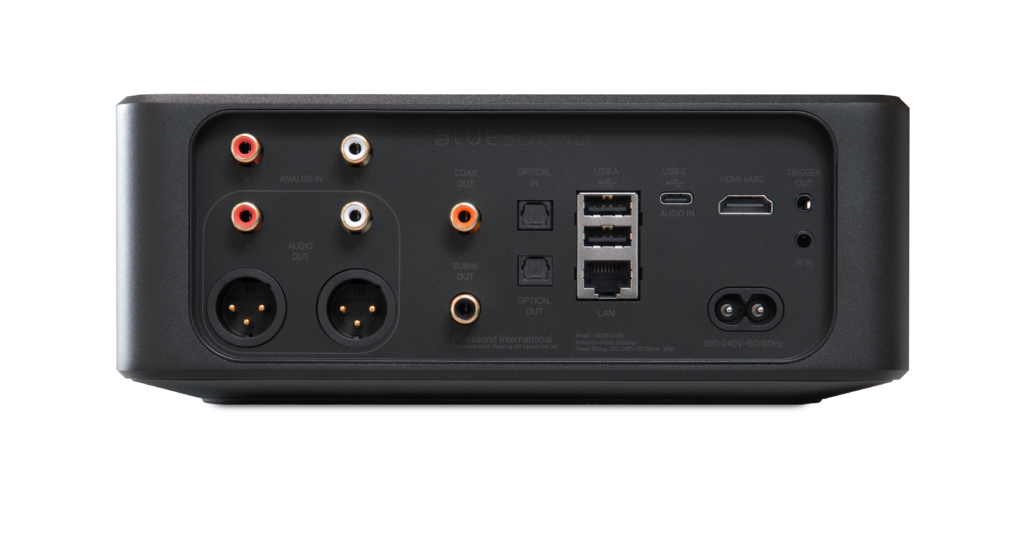
| Analog Outputs | Stereo RCA, balanced XLR |
| Digital Outputs | Coaxial, Optical (Toslink), USB |
| Digital Inputs | Optical (Toslink), USB-C, Analog |
| HDMI | HDMI eARC with Dolby Digital support |
| Subwoofer Output | Yes |
| Room Correction | Dirac Live ready (optional license) |
| Dirac Live Limited Bandwidth License | USD 159 |
| Dirac Live Full Bandwidth License | USD 249 |
| Bluetooth | Two-way Bluetooth, aptX Adaptive |
| Apple AirPlay | Apple AirPlay 2 |
| Headphone Amplifier | THX AAA™ technology |
| Headphone Outputs | 2 × 1/4" |
| Display | 5” full-colour HD display with backlit touch panel |
| Remote Control Support | Programmable IR remote |
| Control Options | BluOS app (iOS, Android, desktop) |
| Chassis Material | Aluminum |
| Finish | Gloss black |
| Dimensions (W × H × D) | approx. 220 × 45 × 190 mm |
| Weight | approx. 1.8 kg |